NABTECH / XOVI NOW

See the bigger picture.
Find your opening.

Bring keywords, competitors and website performance into focus. XOVI NOW gives your next search strategy a clearer direction.

YOUR NEXT CHAPTER IN SEARCH

Your strategy starts here.

Choose the research, monitoring and optimization capacity that fits your work.

Flexible Pricing Options With
30 Day Money Back Guarantee
FROM SIGNAL TO STRATEGY

A wider view.
A more focused plan.

Let's say you want to grow your business in the next year. You could start by investing some money in an SEO agency, but that seems like an overwhelming task for someone who doesn't have technical skills!

Luckily, there is an easier way : let us ensure that people are finding out what makes YOUR company great from their searches online using XOVI NOW.

Keywords

A 100M+ keyword database for research and inspiration

  • Get comprehensive keyword data
  • Find out which keywords your website's ranking for
  • Identify promising keywords for better traffic
  • Analyze your competition's keywords and rankings
  • Compare international markets
  • Profit from a 100M+ keyword database

Benchmarking

Analyse competitors, compare performance and improve your SEO

  • Discover domains that share rankings for the same keywords
  • Identify your niche's leader
  • Compare keyword rankings of two or more domains
  • Track and compare your competition's rankings for important keywords
  • Track and compare Visibility scores

Freelancers

XOVI NOW was designed to provide immediate value for your personal website or your clients’ sites, from an initial site audit through recommendations to improve your search engine results.

Small and Medium-sized Businesses

You don't have to be an SEO expert to improve your business's Google rankings. XOVI NOW will identify the best keywords for your business while also keeping an eye on the performance of your competitors.

UNDERSTAND YOUR PART OF THE WEB

Your opportunity lives
in the wider picture.

A keyword means more when you can see the websites around it. Put competitor research beside your own performance and find a more informed starting point for your next piece of work.

LOOK OUTWARD

Know the competitive space.

Research competing websites and the searches where they appear. Use that context to sharpen your own direction.

LOOK INWARD

Recognize your strengths.

Review your tracked keywords and pages so your plans build on what is already relevant to your business.

LOOK AHEAD

Choose a useful opening.

Combine what you learn with what your customers need, then decide which topic or page deserves attention.

RESEARCH THAT LEADS SOMEWHERE

Bring the next content
opportunity into focus.

Move from a broad subject to a page with a clear purpose. Keyword research and Text Optimizer support the decisions that make content more relevant.

  • 01
    Explore the topicInvestigate related searches before you decide what your next page should cover.
  • 02
    Build a better briefUse your research to shape the questions, structure and useful detail the page needs.
  • 03
    Refine the pageReview the content with Text Optimizer, then edit in your own brand’s voice.
Explore the XOVI NOW toolkit
KEEP THE SIGNALS TOGETHER

A project gives your
progress a home.

Keep the website, its audit, your tracked searches and selected competitors organized around a project. Return to the same context as your SEO work develops.

  • 01
    A defined websiteCreate a project around the URL you want to improve.
  • 02
    A technical baselineThe project starts a Site Audit so you can understand the website’s foundations.
  • 03
    An ongoing perspectiveUse rank tracking to follow your chosen searches alongside your competition.

Make findings actionable.

Advisor connects audit issues to tasks. Use those recommendations to move from reading a report to choosing the next improvement.

Make the plan yours.

Prioritize the work that fits your website, your team and your customers. Research helps you decide where to focus your effort.

FROM YOUR FIRST PROJECT TO YOUR NEXT DECISION

A more deliberate
way to work on search.

Make research useful by turning it into a repeatable sequence. Each pass gives your next decision a little more context.

01 / DEFINE

Set the scene.

Create your project, choose the relevant search engine and add the keywords you want to follow.

02 / INVESTIGATE

Find the signal.

Review the audit and competitive research before committing to the next task.

03 / IMPROVE

Make your move.

Fix the relevant issues and use your research to develop or refine useful content.

04 / RETURN

Keep perspective.

Review what changed, what still needs work and where to focus next.

Find your XOVI NOW plan
ANSWERS, WITHOUT THE GUESSWORK

Frequently Asked Questions

Get to know the tools, recommendations and practical details behind your SEO plan.

What is SEO?

SEO is an acronym for Search Engine Optimization. It is an essential online marketing strategy dedicated to driving prospective customers to your website. Its goal is to optimize a website to gain top positions for selected keywords on search engines. This goal is achieved by strategically employing measures to improve the website's technical setup and contents and obtaining backlinks from other domains.

SEO is divided into three general categories:

  1. Keywords and rankings
  2. On-page SEO
  3. Off-page SEO

SEO specialists apply measures to meet the search engine's ranking factors for each category. Search engines use ranking factors to determine the position in which it lists a website in search results.

Why Do I Need SEO?

Every day, millions of people use search engines to find information or services from all aspects of life: Recipes, guides, products, flights, navigation, tickets, entertainment, and more. Most people navigate the web using search engines to find answers to their questions and solutions to their challenges.

A study shows that 68% of the web's traffic comes from search engines. 53% of this traffic has its origins in organic search—search results that are not ads (paid search) and can be improved through SEO.
In other words, organic search (SEO) and paid search (SEA, ads in search results) make up the lion's share of traffic on the web.

Even where we go offline is significantly influenced by search engines: We use Google and Apple Maps and local search results to find places and nearby services like hairdressers, supermarkets, restaurants, and doctors. We choose our destination based on online reviews. And we instruct search engine-based services to guide us there, be it by car, public transportation, or on foot.

Now, imagine if your business, products, and services are not listed in search results. Imagine people can't find you online to buy your products or find their way to your brick-and-mortar business. Instead, they will most likely choose your competition.

What Can SEO Do For Me?

With the help of SEO, users can find your business, products, and services online—and buy them. As mentioned, that means that people can find you online and much easier offline, too.

SEO maximizes your chances to be listed in top positions for keywords crucial to your business. The better your position, the more people will find their way to your website—preferably on the first page (or top ten) of search results.

Why Page One?

Good question. Studies have shown that 31.7% of users click on the first organic search result (position one); a whopping 75.1% of all clicks go to the top three search results. After that, the number of clicks shrinks rapidly with every following position.

This behavior shows that users rarely look at page two or lower results, let alone click on any of them.

That's why businesses need to be present on the first page of search results, at least for relevant keywords.

In short: It's crucial for freelancers and business owners to

  1. Own a website or any kind of online presence, even if they offer their products or services offline
  2. Perform SEO to make sure they rank on page one for relevant keywords
Why Are Keywords Important?

Keyword is a technical term for search queries (words, phrases, sentences, and questions). With their help, users find content that answers their questions and provides solutions. Put simply, a keyword is the link between users and your website. Search engines compare keywords with websites, looking for content with the highest relevance.

A big part of SEO lies in identifying keywords that have the potential to drive relevant traffic to your website—in other words, bringing in prospective customers. To do that, you need to identify search terms (or keywords) people use when searching for offers like yours. This process is called keyword research. Ideally, keyword research provides you with a list of keywords covering search queries across the entire customer journey.

What Is Keyword Optimization?

So we know that relevance is a crucial factor for a top position in search results. To create relevant content, you want to deal with the topics and questions around a keyword on an individual subpage or URL. Then, make sure your keyword appears in crucial spots on your page.

Let's say you are in the ice cream business. One of your keywords is s'mores ice cream sandwich. Now you focus on everything that has to do with a s'mores ice cream sandwich.

What you want to do is create a recipe page for a s'mores ice cream sandwich where users find an easy-to-follow recipe, pictures or videos, and answers to questions they might have. S'mores ice cream sandwich is your focus keyword that should appear in your page's URL, title, headlines, and more.

Providing a dedicated and keyword-optimized page makes it easy for search engines—and users, too—to determine what your page is all about. That way, they can list it in good positions in related search results.

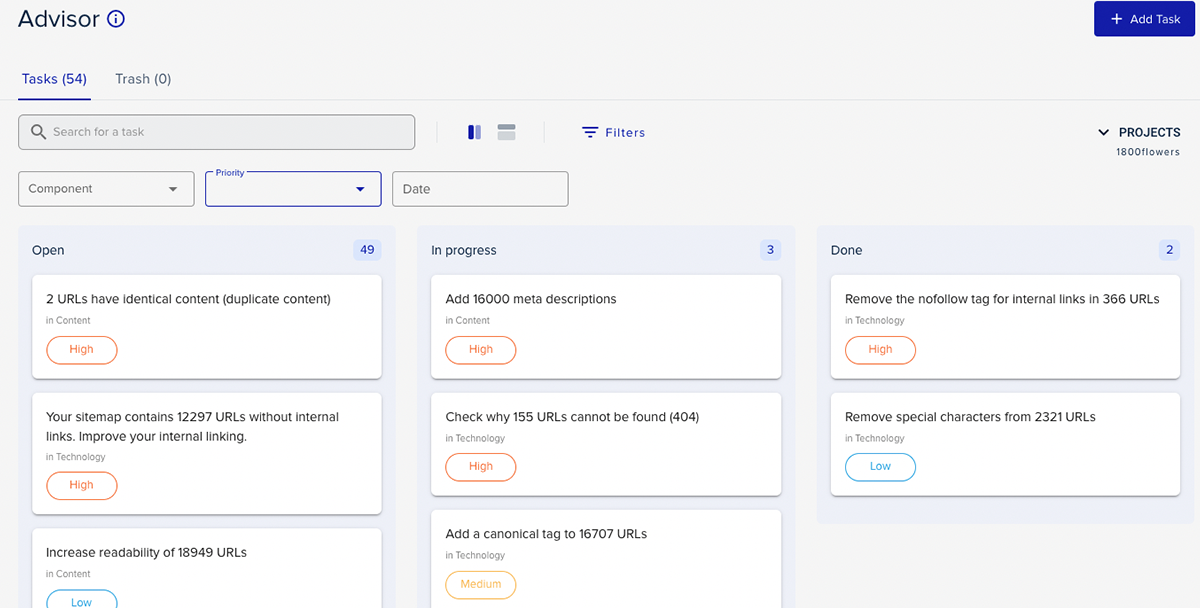
How to use the Advisor

First, check out the advisor's board by clicking Advisor in the top navigation bar. It is a Kanban board helping you organize your tasks by status. Your tasks are color coded by importance:

  • Red: High. Solve ASAP.
  • Yellow: Medium. Tackle those soon.
  • Blue: Low. Keep them in mind and solve them when you can.

You can drag and drop as you complete tasks, assign tasks to other users (depending on your plan), and filter by the assignee.

As mentioned above, tasks are a mix of standard basic SEO measures and issues found in weekly automated audits of your website.

I want an advisor for other websites. How do I get it?

Keep in mind that you do need a Project for the Advisor feature to work. Also, most of the Advisor's tasks are tailored to a Project's website (usually yours or your client's). If you manage more than one website, you'll need to create an extra Project for each of them.

To add or switch to another project, click the Projects menu in the top navigation bar. Depending on your plan, you might need to upgrade it to add another Project.

How do I assign tasks to other users?

To assign a task to other users, you'll need a plan that allows additional users. If your plan includes additional users, you'll find the Assignee menu in your Advisor and tasks. Simply choose a user to assign a task or filter the Advisor by. To add a new user, click on your profile avatar and then click Users. If your plan does not include additional users, you won't see the Assignee menu in your Advisor or tasks. Upgrade your plan to add users.

There are tasks I've already covered. Why do they pop up?

There are two reasons why you might see tasks you've already solved or covered. As mentioned above, tasks are a mix of basic SEO measures and issues found in weekly automated audits of your website.

First, the tasks covering basic SEO measures are the same for everyone and are not tailored to your website or business. For example, we don't know whether you created a Google account for your business and set up Search Console or if you installed SEO plugins. If you already did—great work! Simply flag those tasks as Done.

The second reason is that the Advisor is automatically updated based on the results of automated weekly Site Audits. In other words, if a Site Audit identifies any issues concerning a task you completed in the past, it will automatically be updated and pop up in the Open section.

What is Project Visibility?

Maybe you already stopped to think, “Wait, but I don't care about my visibility for keywords that have nothing to do with my business.” And you are right. While Visibility is a great score to get an idea of your overall performance and compare websites in general, it's not tailored to your specific keyword set.

That's why we provide Project Visibility. This metric is calculated the same way as Visibility, but instead of using 500,000 cross-industry keywords, Project Visibility is exclusively based on keywords in your Rank Tracker.

In other words, Project Visibility is a custom visibility score for the unique set of keywords relevant to your business.

You'll find Project Visibility here: Projects → Rank Tracker → Visibility.

As you might already know, you can also track your competitors' rankings in your Rank Tracker. That way, you'll get Project Visibility for them, too, allowing for a much more realistic comparison. So, even if they have a slightly different product or service portfolio, Project Visibility accounts exclusively for keywords you actually share.

Why is Visibility score useful?

Use your Visibility score as an indicator of your overall SEO performance, problems, and potential for optimization.

1. Get An Idea of Your Overall SEO Performance

You can track rankings for single keywords and know which position you rank on. It's an important thing to do. However, rank tracking does not give you a bird's eye view perspective of the overall improvement of your rankings—but Visibility does. When your SEO measures are effective and rankings improve, so does your Visibility score.

2. Diagnose SEO Problems

A sudden drop in your Visibility indicates problems in your SEO performance. Use Visibility like an alert. If it drops significantly, start digging for what happened. Here's a list of common reasons:

  • You were hit with a Google Penalty. Check Search Console for notifications. Make sure to follow Google's Google Search Essentials.
  • There are ramifications from a recent change in Google's algorithm. Inquire about recent Google Updates and what they entail.
  • Your competitors optimized their websites and content, and now they out-compete you. Compare their (historical) Visibility with yours. Use the Wayback Machine to compare how their content changed.
  • You relaunched your site without SEO in mind. For example, check robots.txt and .htaccess for accidentally blocked pages, increased 404 status codes, faulty 301-redirects, and internal links.

    You changed your content in a way that didn't help your rankings. Consider reversing the changes.

    Your website has technical issues. Run a Site Audit or check your Advisor for open technical tasks. Check your backend for outdated, recently updated, or incompatible plugins that may cause havoc.

    Hosting issues are the cause. Inquire whether your host made recent changes, has been hacked, moved their servers, or experienced technical difficulties. See if your server has issues.

Keep in mind that this list is not exhaustive. One or more of those reasons can apply simultaneously, or there could be other reasons altogether.

3. Competitor Comparison

Visibility is a great metric for a quick comparison of two or more websites. Check your Visibility against theirs. Who is out-competing who? Has a competitor outperformed you in the past or vice versa? Who's leading the field, and how big is the gap between you and your fiercest competitor? Answering those questions will help you develop an SEO strategy to come out (and stay) at the top of your niche.

4. Track Visibility Development Over Time With Historical Data

Want to know how a website fared over time? We provide historical data going all the way back to 2009, free of seasonal fluctuations. That way, you can track and compare historic Visibility and see their development over long periods of time.

How Can I Improve My Visibility Score?

Short answer: Don't make improving Visibility a goal in your SEO strategy.

Long answer: Visibility reflects the quality of your rankings in a single metric; it won't lead to better rankings. Make it your goal to improve your rankings for relevant keywords that prospective customers actually use to find products and services like yours. Improving your rankings will improve your Visibility, too. But it's your rankings that really matter.

As a rule of thumb, your Visibility score will be higher if

  • Your domain's URLs rank in good positions
  • You have a high number of indexed URLs with good rankings
  • You rank well for keywords with a high search volume
How do a project, Site Audit and Advisor work together?

A project is based on a website URL. Creating it begins the Site Audit, and the audit findings are added to Advisor as tasks. That keeps your website context and the recommendations connected.

Is XOVI NOW useful for an existing website?

Yes. You can create a project for the website you already operate, review its current condition and research the keywords and competitors relevant to it. You do not need to build a new site to begin SEO work.

Should I track every keyword related to my business?

Start with the searches that matter most to your actual customers and pages. A focused set is easier to review and act on. Compare your plan’s tracking allowance with the number of searches you want to follow.

What determines how long the first site audit takes?

The size and accessibility of the website affect the scan time. A small website can finish sooner than a large catalogue. Use the audit status in your project and review the findings once the scan has completed.

YOUR NEXT OPPORTUNITY IS OUT THERE

Turn a clearer view
into your next move.

Explore the right XOVI NOW plan for your website and bring more direction to your SEO work.